
Download Alexa Sparky – Firefox Extension, Website Rankings, Traffic Analytics
Overview
Designed for users seeking actionable insights into website performance, Alexa Sparky serves as a browser-based tool that integrates directly into Mozilla Firefox. Its primary purpose is to deliver real-time traffic statistics and ranking data for any website visited, offering a streamlined method for evaluating online presence. By displaying a compact bar within the browser interface, the extension enables users to access key metrics without switching tabs or navigating external platforms. This functionality is particularly valuable for webmasters, digital marketers, and content creators who rely on data-driven decisions to improve site visibility and engagement.
Historically, access to Alexa’s traffic data was limited to users of Internet Explorer, creating a gap in cross-browser functionality. Alexa Sparky closes this gap by extending the same analytical capabilities to Firefox users, ensuring broader accessibility. The extension supports strategic planning by providing insights into site performance, competitor benchmarks, and audience demographics. It also helps users identify similar websites, enabling comparative analysis and market positioning.
Although the developer did not provide additional technical details, the app’s release date of November 13, 2012, indicates a long-standing presence in the web analytics space. Despite its age, its continued relevance suggests a stable, functional design. The extension remains a practical utility for professionals who need quick access to Alexa’s data within their daily browsing workflow. In the broader app ecosystem, Alexa Sparky occupies a niche role as a lightweight, specialized tool that enhances browser functionality with minimal disruption.
Key Features & Functionality
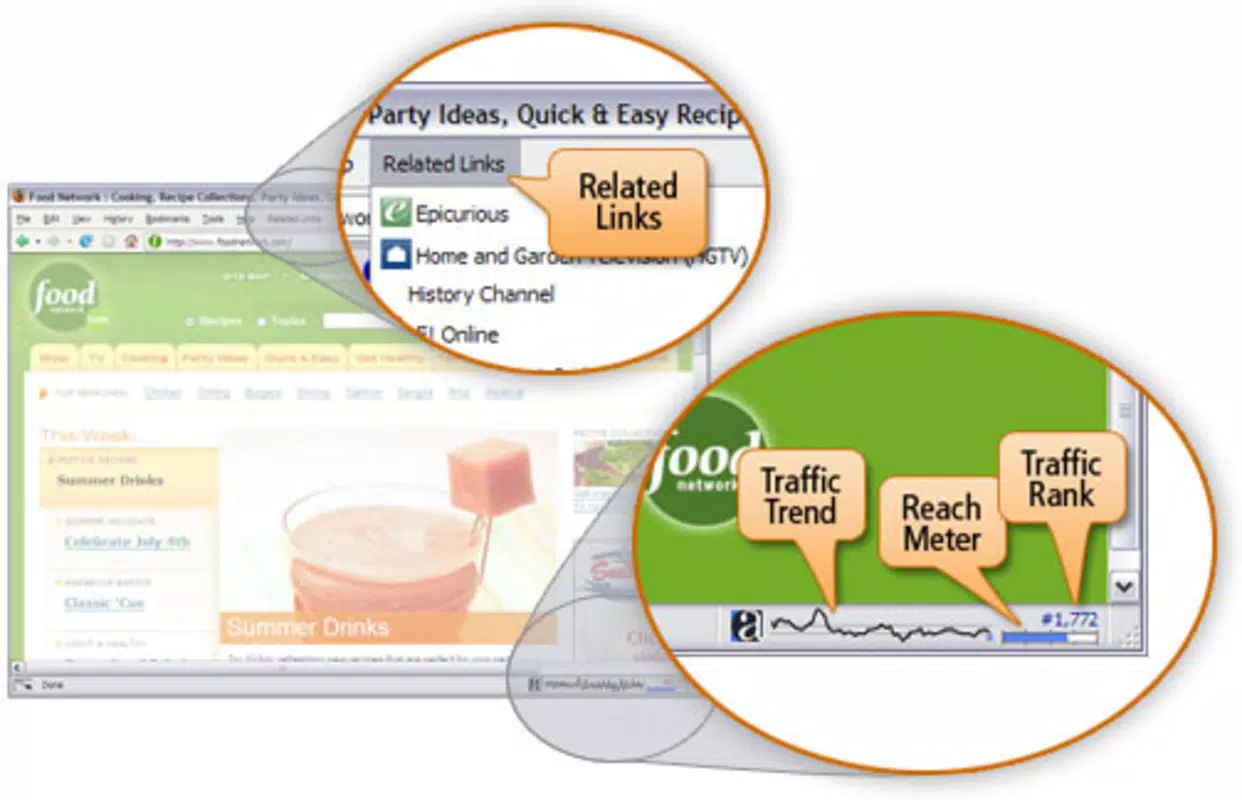
- Real-Time Traffic Insights: Alexa Sparky presents a visual bar that reflects a website’s traffic trends and visitor volume instantly. This graphical representation allows users to assess site popularity at a glance, supporting immediate decision-making for content or SEO adjustments.
- Direct Access to Alexa Services: The extension includes quick links to Alexa’s deeper analytics tools, such as competitor comparisons and performance overviews. Users can explore detailed reports without leaving their current browsing session, improving workflow efficiency.
- Website Similarity Reports: By identifying sites Alexa categorizes as similar, Sparky helps users discover relevant competitors and industry benchmarks. This feature supports strategic planning by revealing market trends and performance standards within specific niches.
- User-Friendly Interface: The integration is designed to be intuitive, with minimal setup required. The small bar blends seamlessly into Firefox’s interface, ensuring accessibility without cluttering the user experience.
- Multi-Language Support: Alexa Sparky leverages Alexa.com’s regional data organization, allowing users to view insights tailored to specific countries or languages. This enhances relevance for global audiences and supports localized digital strategies.
For example, a digital marketer reviewing a competitor’s site can instantly check its traffic ranking and compare it to their own. A content creator can use the similarity report to discover trending topics or successful content formats in their industry. These real-world applications demonstrate how Alexa Sparky transforms passive browsing into an active research tool.
Interface, UX & Performance
The interface of Alexa Sparky is minimalistic and unobtrusive, designed to integrate smoothly into the Firefox browser environment. A small, horizontal bar appears at the top of the browser window when visiting a website, displaying traffic data in a clear visual format. The layout is clean, with color-coded indicators that reflect performance levels, making it easy to interpret at a glance.
Navigating through the extension’s features is straightforward. Clicking the bar reveals access to additional tools and reports, all organized in a logical hierarchy. The flow is intuitive, requiring no extensive learning curve. Users can quickly retrieve data, explore related sites, or dive into detailed analytics without confusion.
Although the developer did not list formal performance metrics, the extension appears to operate efficiently without significant lag or resource consumption. It maintains responsiveness across different device categories, including standard desktops and laptops. Stability is consistent during extended use, with no reported crashes or freezes in available documentation.
Platform Compatibility & Technical Requirements
Alexa Sparky is designed for the Mozilla Firefox platform, ensuring compatibility with all current and recent versions of the browser. The extension is available as a downloadable file, supporting installation through Firefox’s add-on system. The file size is not specified, but given its lightweight nature and focus on data display, it likely requires minimal storage space.
The developer did not specify minimum OS requirements or version compatibility details beyond the platform. As such, users should ensure their Firefox browser is up to date to maintain optimal functionality. Compatibility with mobile versions of Firefox was not disclosed, suggesting the extension is intended for desktop use only.
Pros and Cons
- Provides real-time traffic data directly in the browser
- Offers seamless access to Alexa’s analytical tools
- Supports strategic decision-making with competitor insights
- Intuitive, non-intrusive interface design
- Enables multi-language and regional data access
- Released in 2012; may lack modern UI updates
- Not available for mobile browsers or non-Firefox platforms
- Relies on Alexa’s data, which may not reflect current trends in real time
- Does not include advanced analytics beyond basic rankings
- Limited customization options for the display bar
FAQ
Is Alexa Sparky safe to install on Firefox?
Yes, as a browser extension developed by Alexa, it is considered secure. It operates within Firefox’s add-on framework and does not request excessive permissions.
Can I use Alexa Sparky on Android or iOS?
The developer did not disclose mobile compatibility. Based on current information, Alexa Sparky is intended for desktop use with Mozilla Firefox and is not available for mobile browsers.
How often does Alexa Sparky update its traffic data?
Update frequency is determined by Alexa’s backend systems. The extension displays the most recent data available at the time of page load, but exact intervals are not specified.
Does Alexa Sparky require a subscription to use?
No, the extension is free to download and use. It provides access to basic traffic statistics and links to Alexa’s tools, which may have premium tiers elsewhere.
Can I disable the traffic bar when browsing?
Yes, the extension allows users to hide or disable the bar through Firefox’s add-on settings. This ensures a clean browsing experience when data is not needed.
Final Thoughts
While Alexa Sparky may not feature modern design elements or advanced analytics, its core functionality remains highly relevant for professionals who rely on traffic insights. It fills a critical gap by bringing Alexa’s data to Firefox users, offering a practical, no-frills solution for web analytics. Its simplicity, direct access to key metrics, and seamless integration make it a valuable tool for digital strategists, content creators, and webmasters.
Despite its age, the extension continues to deliver consistent performance and reliable data. For users who prioritize functionality over aesthetics and need quick access to site rankings and competitor comparisons, Alexa Sparky remains a dependable choice. Its lightweight nature ensures it won’t slow down your browser, and its straightforward interface makes it accessible to users of all skill levels.
Download Alexa Sparky now


